
Designed & developed
PrinceLists
Todo lists for Obsidian, kept as plain Markdown notes, with a Schedule across all of them.
Get PrinceLists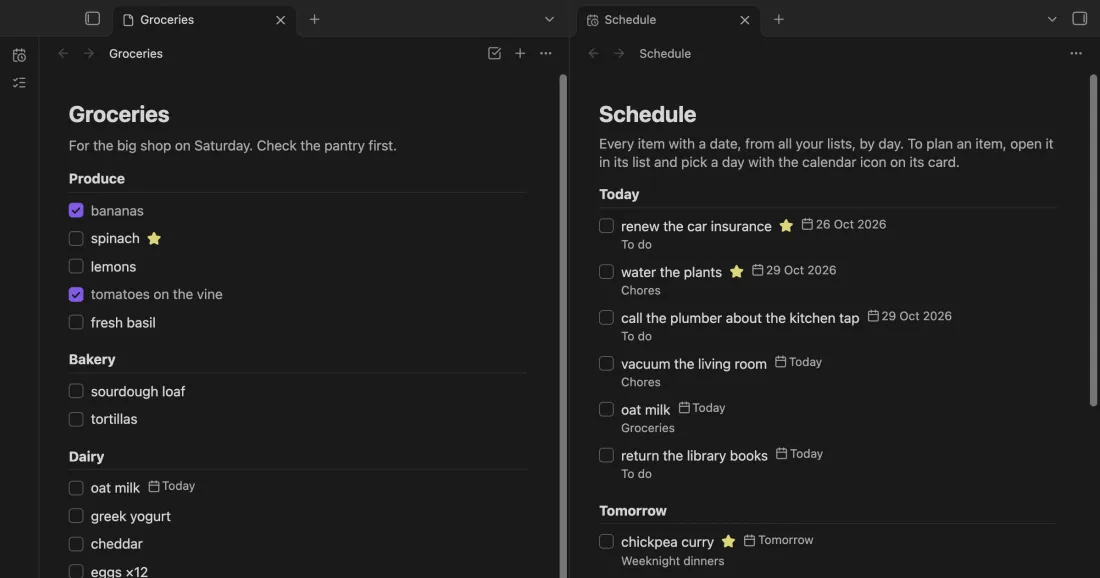
- Problem
- Obsidian is one of the tools I use every day, with great UX, a reliable plugin platform and a strong community. It's weak at todo lists, though, so mine lived in a separate app I was never happy with, apart from the notes they belonged to.
- Approach
- Build on Obsidian instead of building another todo app. A list is an ordinary note, so it sits in the project folder it belongs to and links, searches and syncs like any other note. Inside, it works like a dedicated todo app, on desktop and phone.
- Outcome
- I moved all my todos into it and stopped using my old todo app, so a project's notes and lists now share one folder. It's published in Obsidian's community plugin directory and open source under the MIT license.
PrinceLists gives Obsidian a proper todo list without a separate database or file format. Open a list as Markdown at any time, or turn it back into a regular note for good.
What it does
- Any note can be a list — make a new one, or turn a note with checkboxes into one.
- Items with real notes — each has a title, a star, a date, and notes that hold links, checklists, tables, code and pictures.
- Tick and forget — ticked items hide after a day, or a time you choose, and Show archived items brings them back.
- The Schedule — dated items from all your lists, under Today, Tomorrow, Next 7 days and Later.
- Lists inside notes — embed a list in any note, and tick and edit it there.
On your phone too
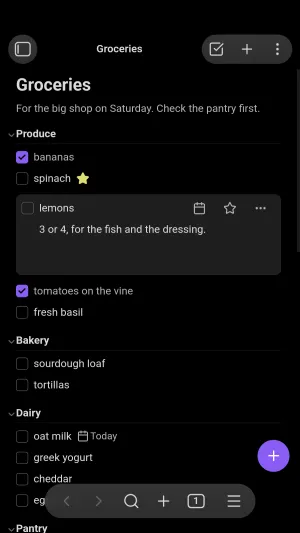
It’s made for touch as well as the keyboard: a floating add button, finger-sized controls, and hold to drag.
How it’s built
A list is stored as the Markdown you’d write by hand, with one line of frontmatter to mark it. Because only the lines you edit change, the rest of the note stays as you wrote it, and other tools keep working on the same file: Tasks still reads the dates and sees ticked items as done.
Item notes edit the way Obsidian’s own Live Preview does, showing Markdown syntax only where the cursor is. It’s private by design: no account, no network requests of its own, and no data collected.
The source is on GitHub. Install PrinceLists from its listing, or in Obsidian from Settings → Community plugins → Browse.