Designed & developed
PrinceShade
A macOS menu-bar app that dims your displays beyond the system minimum and warms them — independently, per display.
Visit PrinceShade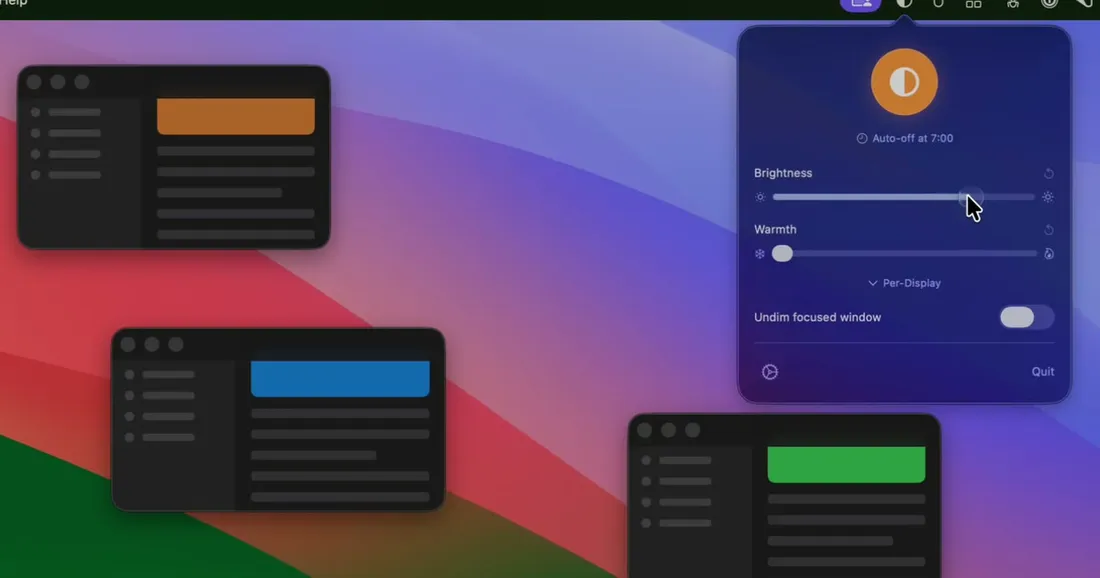
- Problem
- External monitors often can't be dimmed in software, and late-night work wants a screen warmer and darker than macOS lets you go.
- Approach
- A menu-bar-only app (no Dock icon) that paints a per-display brightness overlay and a warm tint, with a daily schedule, global hotkeys, and launch-at-login. Built fully event-driven — zero polling timers — and privacy-first by default.
- Outcome
- Shipped on the Mac App Store. ~16 MB RAM at launch (under 35 MB after use), settings that persist and restore across sleep/wake and display changes, and no analytics or tracking.
PrinceShade is a small, focused macOS utility: take any display darker than the brightness keys allow, add a warm amber tint that’s gentler than Night Shift, and do it per display — perfect for external monitors that don’t support software brightness at all.
What it does
- Brightness past the minimum — a black overlay dims below the system floor.
- Warmth — a warm filter that cuts blue light, independent of brightness.
- Per-display control — every connected screen gets its own settings.
- Daily schedule, global hotkeys, launch-at-login — set it and forget it.
- Sleep/wake & display-change aware — overlays are restored when you wake or plug in a monitor.
How it’s built
It lives entirely in the menu bar and is fully event-driven — no polling timers, which keeps it at roughly 16 MB of RAM and effectively zero idle CPU. It’s privacy-first: no analytics, no tracking, no accessibility permissions; the only optional network call is opt-out crash reporting, with paths and secrets scrubbed before anything leaves the machine.
It’s distributed exclusively through the Mac App Store, so updates are handled automatically with no in-app updater to maintain.